Sell courses and classes for school students.
Devaishno LMS is a platform that has three parts. It has a website that students can use to find and enroll in courses. It also has an app that students can use to learn from anywhere.. It has a special panel for administrators to manage courses and students and payments and staff. This platform is made for schools and teachers in India.
- You can browse courses. Enroll in them and pay for them using Razorpay.
- The lessons are in video form. Are on YouTube. If you stop a lesson it will start again from where you stopped.
- Students can use the app to learn when they are not at home or, in school.
- The administrators have a panel where they can control who can do what and they can see all the payments that have been made.
Web App · Student Mobile App · Admin Panel — three modules, one platform
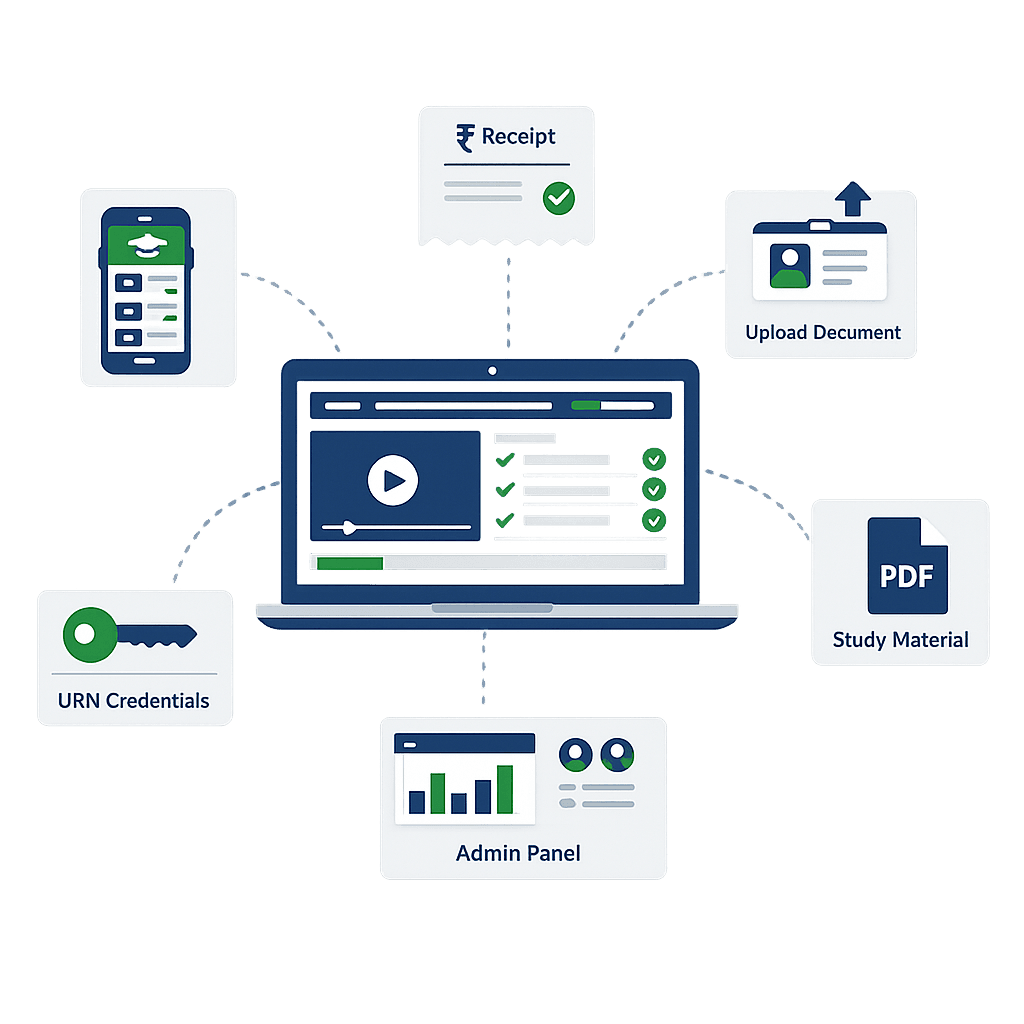
Everything Your LMS Platform Needs
Devaishno LMS is what your learning management system needs. It has three parts: a website that people can use to find and sign up for courses an app for students to learn on the go and a control panel for administrators to manage everything.
Course Management
You can make courses with lots of details like descriptions, pictures, prices and discounts. You can also choose which courses to feature on the home page.
Course Content Management
Course content is easy to manage. You can break each course into subjects and videos. The administrator adds YouTube video IDs for each lesson. Decides the order they are shown. They can also add study materials that students can download.
Student Enrollment & Approval
When students want to enroll in a course they fill out a form. Upload some documents like their student ID and Aadhaar card. The administrator checks the form and approves. Rejects it. If it is approved the student gets their login details automatically.
Razorpay Payment Integration
The payment system is secure. Uses Razorpay. Students can pay with their card, net banking or wallet. The payment status is updated in time.
Video Learning with Resume
The video player is really good. It uses YouTube videos. Has controls like play, pause and speed. It also remembers where the student stopped watching so they can pick up where they left off.
Student Mobile App
There is a mobile app for students. They can use it to access their courses watch videos and download study materials.
Admin Dashboard
The administrator has a dashboard that shows them everything that is happening. They can see how many students are enrolled how many courses are available and how much money is being made. They can also see trends. Filter the data by day, week or month.
Role-Based Access Control
The administrator can give roles to their staff members like course manager or finance manager. Each role has its set of permissions so staff members can only do what they are supposed to do.
Student Management
The administrator can also manage the students. They can see who is enrolled in which course when they signed up and if their account is active or not. They can. Unblock students, from accessing the content.
Payment Logs
All the payment records are kept safe. The administrator can see the details of each transaction including the students name the course they paid for and the payment status. They can filter the records by date, status or course.
Study Material Access
The study materials are stored securely on Cloudinary. The administrator can add files to each video lesson and students can view them online or download them.
Purchase Management
The administrator can manage all the enrollment applications. They can. Reject them with just one click. If an application is approved the student gets their login details automatically.
Website
The website that people use to find and sign up for courses.
Student Mobile App
The mobile app that students use to access their courses.
Admin Panel
The control panel that administrators use to manage everything.
From Course Creation to Student Learning
Let us take a look at how the Devaishno LMS platform works. We will go through everything from setting up the account to a student watching their first lesson.
Admin Creates Course
The admin creates a new course. They give the course a name, description, thumbnail, pricing and category. They also add subjects and YouTube video IDs to each lesson. Sometimes they add study materials too.
Student Browses & Enrolls
The student looks through all the courses available. They click on a course to see details and then they can enroll in it. To enroll they have to fill out a form and upload their student ID and Aadhaar card.
Payment via Razorpay
The student pays for the course using UPI, card, net banking or wallet through Razorpay. When the payment is successful the application is marked as paid and sent to the admin to review.
Admin Reviews Application
The admin checks the documents that the student uploaded in the admin panel. They then. Reject the application. If the application is rejected the student gets a notification automatically.
The Student Gets Their Login Details
When the admin approves the application the system automatically generates a Registration Number and a temporary password. These are sent to the student by email or SMS.
The Student Logs Into The Platform
The student logs into the website or mobile app using their Unique Registration Number and password. When they log in they see their dashboard with all the courses they are enrolled in and the subjects they are studying.
Watch & Resume Videos
The student can watch video lessons on the platform. The videos are, from YouTube. The student can play, pause and speed up or slow down the video. The platform remembers where the student stopped watching so they can start again from the place.
Access Study Materials
The student can also. Download study materials that are attached to each video lesson. These study materials are stored on Cloudinary and the student can access them on the website or mobile app.
Three Modules, One Complete Platform
The Devaishno LMS is made up of three parts that all work together. These parts are like three tools. The Devaishno LMS has three modules. Each module of the Devaishno LMS is, for a group of people and is used in a different way. The three modules of the Devaishno LMS are connected to each other.
User Web Application
A website for students to find and buy courses enroll with documents. See their learning portal.
- Students can browse courses, search, filter by category and sort by price
- They fill an enrollment form with Student ID and Aadhaar upload
- Payment is made through Razorpay using UPI, card, net banking or wallet
- Students have a dashboard with their enrolled courses and subjects
- They watch videos on YouTube iFrame player with speed control and resume
- Study materials like PDFs and images are downloadable per lesson
Student Mobile App
An Android app for students to access courses watch video lessons and download study materials anywhere anytime. They cannot buy courses here.
- Students log in with URN and password
- They access their enrolled courses and subjects
- Video playback is on YouTube iFrame with full controls
- Videos auto-resume from the watched position
- Students. Download study materials like PDFs and images
- They see progress indicators per video
Admin Panel
A system, for admins to manage courses, student enrollments, payments and platform settings.
- The dashboard shows students, courses and revenue
- Admins manage courses, subjects, videos and study materials
- They review enrollment applications and approve or reject with one click
- URN is auto-generated and credentials are sent on approval
- Staff members have role-based access control
- Payment logs show Razorpay transactions with filters